How to Clean Different Fiber Optic Connectors: MTP/MPO, LC, and Bulkheads
In part one of our series, we covered the essential tools and golden rules of fiber optic hygiene. However, applying those universal rules requires specific physical techniques depending on the hardware you are handling. This detailed guide provides step-by-step best practices for cleaning various fiber optic connector types to ensure your network remains pristine.

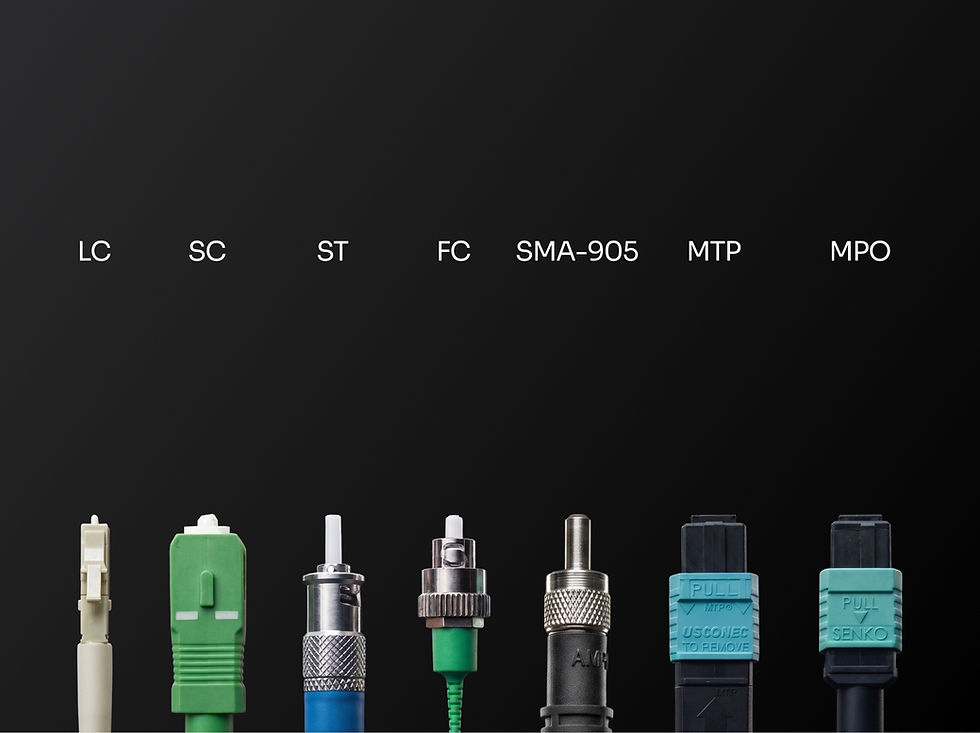
Cleaning Single-Fiber Connectors (LC, SC, FC, ST)
Exposed End Face: Dry Cleaning
Remove the connector dust cap (both caps on a duplex-clipped pair).
Depress the advance lever on your reel cleaner to expose a fresh section of lint-free cloth.
Lightly place the connector end face flat against the cloth and wipe once in the direction of the arrow. Do not scrape the ferrule against the surrounding metal frame.
Re-inspect with the microscope, if it fails, move to wet cleaning.

Exposed End Face: Wet Cleaning
Advance to a fresh section on the reel cleaner.
Apply a minimal drop of optical grade cleaning fluid to the top half of the exposed cloth zone, leaving the bottom half dry.
Lightly wipe the connector end face smoothly from the wet zone straight through into the dry zone in a single motion. Do not scrape the ferrule against the surrounding metal frame.
Re-inspect with the microscope

Installed in a Bulkhead Adapter: Wet Cleaning
Remove the adapter dust cap.
Dampen the tip of a cleaning stick with optical grade cleaning fluid, then remove the excess by lightly tapping the tip.
Insert the damp stick into the adapter sleeve until it contacts the installed connector end face.
Rotate the stick 6–10 times with light pressure.
Withdraw the wet stick, insert a completely dry cleaning stick, and rotate 2–3 times to clear remaining fluid.
Discard sticks immediately and re-inspect.
Cleaning MTP/MPO Connectors
Multi fiber connectors require higher care because a single particle can affect multiple channels. The procedures below apply to both female (unpinned) and male (pinned) exposed end faces. For a pinned connector, use the reel cleaner for male.
MTP/MPO End-Face: Dry Cleaning Options
Option A: reel cleaner
Remove the dust cap.
Advance to a fresh section on the reel cleaner.(Ensure you use a male-compatible reel if the connector has guide pins).
Lightly place the end face on the cleaning cloth and wipe once in the direction of the arrow, preventing any contact with the metal frame.
Re-inspect with the microscope.

Option B: Push-style cleaner
Remove the dust cap.
Open the hinged cover on the IBC cassette cleaner to expose the cleaning cloth.
Lightly bring the end face into contact with the IBC cleaning cloth and rotate the indexing wheel a quarter turn.
Re-inspect with the microscope.

MTP/MPO End-Face: Wet Cleaning Methods
If dry cleaning fails, use the reel cleaner wet-to-dry method:
Remove the dust cap.
Hold down the green lever on the reel cleaner to expose the cleaning cloth (use the male reel cleaner for a pinned connector).
Lightly dampen the top portion of the cloth with AFL FCC2, leaving the bottom half dry.
Lightly place the end face on the wet portion, then wipe from the wet area onto the dry area, preventing any contact with the metal frame.
Repeat step 4 on a fresh, dry section of the reel cleaner cloth.
Re-inspect with the microscope.

Alternatively, you can utilize the alternate cleaning-stick method:
Remove the dust cap.
Tilt the AFL FCC2 can back slightly, depress the pump, and fill the dispensing well.
Dampen the tip of a cleaning stick with optical grade cleaning fluid, then remove the excess by lightly tapping the tip.
With the damp tip, lightly wipe the end face perpendicular to the fiber array. For a pinned connector, hold the damp tip parallel to the pins so the tip contacts the ferrule and wipe the cylindrical surface of each pin.
Repeat steps 3–4 with a dry cleaning stick tip.
Discard sticks immediately and re-inspect.
MTP/MPO End-Face: Non-Contact cleaning Method
MTP/MPO connectors may be cleaned with dry compressed air for loosely attached contaminations.
Remove the connector dust cap.
Spray the connector end face using a short bust of dry air.

Bulkhead Adapter Cleaning for MTP/MPO
For bulkhead adapters, inspect and clean the plug end face, as the adapter itself can also be a source of contamination.
Dry cleaning
Remove the adapter dust cap.
Remove the clear cover on the IBC cleaner to expose the cleaning cloth.
Insert the IBC into the bulkhead MTP/MPO adapter so the end face contacts the cleaning cloth; apply light pressure and rotate the indexing wheel about a quarter turn.
Inspect the end face with the inspection microscope.

Wet cleaning
Remove the adapter dust cap.
Dampen the tip of a cleaning stick with optical grade cleaning fluid, then remove the excess by lightly tapping the tip.
With the damp tip, apply light pressure to the end face and wipe perpendicular to the fiber array. For a pinned connector, insert the damp tip and hold it parallel to the pins so the tip end contacts the ferrule; wipe the cylindrical surface of the pins.
Insert the IBC into the bulkhead adapter so the end face contacts the cleaning cloth; apply light pressure and rotate the indexing wheel about a quarter turn.
Discard the cleaning stick and inspect the end face with the inspection microscope.
Advanced: Cleaning Pins and Pinholes
Pin and pinhole cleaning is reserved for troubleshooting a high-loss connection and should be performed only by experienced technicians.
Pins (male connectors)
Dampen a lint-free wipe with AFL FCC2 and wipe each pin clean.
Inspect the pin surface and the ferrule around each pin with an eye loupe or the inspection microscope at 50x.
If debris remains, wipe it away with an optical solvent-dampened, lint-free optical swab; if that fails, scrub around the pins with a pinhole brush.
Re-inspect with the inspection microscope.
Pinholes (female connectors)
Moisten a fine pinhole brush (e.g., a TePe dental brush) with optical solvent—never use it dry—and insert it into the pinhole with a 90-degree turn until it bottoms out.
Gently twist the brush 180 degrees back and forth three times.
Pull the brush straight out while maintaining a 90-degree twist.
Inspect the pinhole with the inspection microscope at 50x: check the leading edge first, then focus down the hole for deeper contamination.


Common Fiber Optic Cleaning Mistakes to Avoid
Skipping inspection. Always inspect first, then clean only if needed.
Using the wrong solvent. Drugstore Isopropyl Alcohol (IPA) isn't pure enough for optics, since it leaves a residue and attracts moisture as it dries. Use a dedicated cleaning fluid such as AFL FCC2 or 99% pure electronic-grade IPA.
Wiping back and forth. Use one-direction wiping so debris is removed rather than redistributed.
Touching end-face surfaces. Oils from your fingers will instantly ruin the end face.
Over-wetting or skipping the dry step. Finish wet cleaning on a dry surface so no residue is left behind.
Ignoring the bulkhead or port. Dust hides inside the mating adapter sleeve. Clean both the patch cord plugs and the inside bulkhead port to ensure a clean link.
Reusing Cleaning Supplies. Cleaning sticks, wipes, and exposed reel windows are strictly single-use consumables. Reusing them introduces cross-contamination.
Be sure to review part one of our series for a complete deep dive into the essential fiber cleaning tools, the critical differences between optical-grade solvents and drugstore IPA, and the universal golden rules of fiber hygiene.
Next Step
Proper handling extends the life of your entire infrastructure. Download our free Fiber Cleaning & Inspection Checklist to put the inspect-clean-inspect workflow on every bench and truck, or contact our team for help specifying connectors and assemblies engineered for reliable, repeatable performance.